
Download Qlearly – Free Bookmark Organizer & Tab Manager
Overview
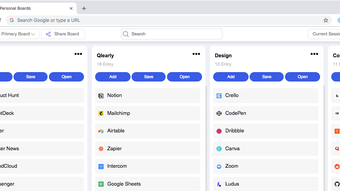
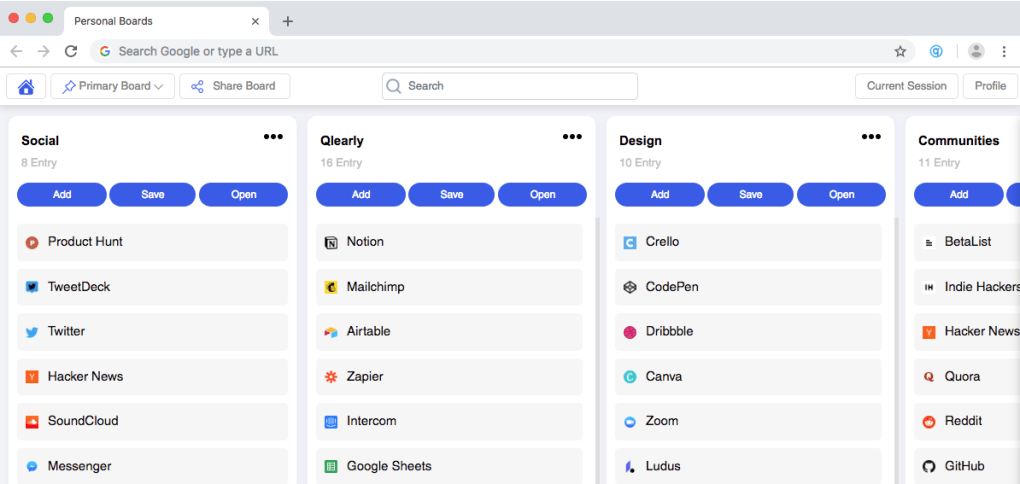
Qlearly is a free browser add‑on designed by Guillaume Bardet to bring order to the chaotic world of bookmarks and open tabs. In today’s multitasking environment, users often end up with dozens of tabs and a sprawling list of saved pages that are difficult to locate. Qlearly solves this problem by turning the new‑tab page into a personal, visual board where every favorite site lives in its own column or board.
The moment you open a new tab, the board loads automatically, offering a clean, at‑a‑glance view of your most important resources. What sets Qlearly apart is its ability to sync boards across multiple devices, ensuring that whether you’re on a Windows laptop, a macOS desktop, or even a mobile browser, your organized workspace follows you. A unified search bar sits at the top of the board, allowing instant navigation with custom shortcuts that you can tailor to your workflow.
Collaboration is also built‑in: you can share entire boards with teammates or friends, making Qlearly a lightweight project‑management companion. Because the add‑on is completely free, it appeals to students, freelancers, and corporate users alike who need a secure, fast, and highly customizable way to manage their web resources without paying for a premium subscription. The interface is minimalist yet powerful, and because it runs as a lightweight extension, it does not slow down your browsing experience.
In short, Qlearly transforms the traditional bookmark folder into an interactive, searchable, and shareable workspace that boosts productivity and reduces the time spent hunting for that one crucial tab.
Key Features & Capabilities
- Column‑Based Board Layout: Organize bookmarks into vertical columns or custom boards for visual clarity.
- Instant New‑Tab Loading: Your personal board appears automatically whenever you open a new tab.
- Cross‑Device Sync: Boards are synced via the browser’s native sync feature, keeping your layout identical on Windows, macOS, Linux, Android, and iOS.
- Unified Search & Shortcuts: A single search field searches across all boards, and you can assign keyboard shortcuts for rapid access.
- Collaboration Sharing: Export or share a board’s URL with colleagues, enabling collaborative research or project planning.
- Drag‑and‑Drop Customization: Rearrange tabs and bookmarks by simple drag‑and‑drop, no coding required.
- Privacy‑First Design: Qlearly stores data locally or via the browser’s encrypted sync, ensuring your bookmarks remain private.
- Lightweight Performance: The add‑on uses minimal memory, keeping page load times fast.
- Theme Support: Choose between light, dark, or system‑default themes to match your browser aesthetic.
- Multi‑Browser Compatibility: Available for Chrome, Edge, Firefox, and Chromium‑based browsers.
Installation, Usage & Compatibility
Installing Qlearly is straightforward. Visit the official Chrome Web Store, Firefox Add‑Ons site, or Microsoft Edge Add‑ons catalog, search for “Qlearly”, and click “Add to Browser”. The extension is free, and the installation process takes less than a minute.
Once installed, you’ll see a small Qlearly icon next to your address bar. Click the icon to open the board editor for the first time. The onboarding wizard guides you through creating your first column, adding bookmarks, and setting up a custom search shortcut.
Step‑by‑Step Usage:
- Open a new tab – the default Qlearly board appears.
- Hover over a column header to rename it or add a new column.
- Drag a website’s tab into a column to save it as a bookmark.
- Use the search bar at the top to locate any bookmark instantly.
- Right‑click a bookmark for options: edit, delete, or share the board.
- Access Settings via the Qlearly icon to configure sync, shortcuts, and themes.
Qlearly’s Windows, macOS, Linux, Android, iOS compatibility is achieved through the browsers’ own sync mechanisms. When you sign into the same browser account on multiple devices, your board data is encrypted and transferred automatically, ensuring a seamless experience. The add‑on does not require any additional software or server‑side accounts, which simplifies the privacy model. Updates are pushed automatically through the browser’s extension update system, guaranteeing that you always have the latest features and security patches without manual intervention.
Pros, Cons & Frequently Asked Questions
Pros
- Free to use with no hidden fees.
- Visual board layout makes bookmark retrieval intuitive.
- Cross‑device sync preserves your workspace everywhere.
- Lightweight and does not impact browser performance.
- Built‑in sharing enables quick collaboration.
- Highly customizable with themes, shortcuts, and drag‑and‑drop.
Cons
- Limited to browsers that support extensions; not available for Safari.
- Advanced team collaboration features (e.g., permissions) are not present.
- Requires a browser account for sync, which some privacy‑focused users may avoid.
FAQ
Is Qlearly really free or are there hidden costs?
Qlearly is completely free. There are no premium tiers, in‑app purchases, or subscription fees. All features, including sync and board sharing, are available at no cost.
Can I use Qlearly on mobile browsers?
Yes. Qlearly works on Chrome for Android and iOS, as well as other Chromium‑based mobile browsers. The board layout adapts to smaller screens, and the sync feature ensures your mobile device mirrors the desktop board.
How secure is my bookmark data?
Your data is stored locally and encrypted when synced through the browser’s native sync service (e.g., Google Account sync). Qlearly does not collect or transmit personal information to external servers.
What browsers are supported?
Qlearly is available for Google Chrome, Microsoft Edge, Mozilla Firefox, and any Chromium‑based browser. It is not currently available for Safari.
Can I import existing bookmarks into Qlearly?
Yes. In the Settings panel, you’ll find an “Import Bookmarks” option that lets you pull in your current browser bookmark folders and automatically place them into columns.
Conclusion & Call to Action
For anyone who spends a significant portion of their day hopping between web pages, Qlearly offers a refreshing alternative to the traditional bookmark list. Its visual board approach, combined with powerful search, cross‑device sync, and effortless sharing, makes it a standout tool in the crowded space of browser extensions. Because it is free, lightweight, and respects user privacy, there is little reason not to give it a try. Install Qlearly today, customize your workspace, and experience a faster, more organized browsing routine. Click the download button for your preferred browser, set up your first board in minutes, and let Qlearly keep your favorite sites at your fingertips.
Overall Rating: 4.5 / 5







